How to Deploy Forgejo – Lightweight Git Server

How to Deploy Forgejo – Lightweight Git Server
Deploy Forgejo with Docker Compose and Traefik for secure, lightweight self-hosted Git hosting
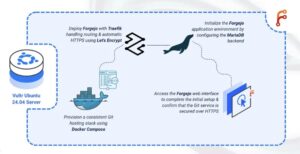
Forgejo (a fork of Gitea) is a community-managed, lightweight code hosting solution focused on speed, simplicity, and community ownership. It provides Git repository hosting, code review, issue tracking, and CI/CD features in a self-hosted environment. Forgejo is efficient, easy to deploy, and runs on a wide range of hardware, from Raspberry Pis to powerful servers.
This article demonstrates how to deploy Forgejo on Ubuntu 24.04 using Docker Compose and secure it with HTTPS via a Traefik reverse proxy.
Prerequisites
Before you begin:
- Have access to an Ubuntu 24.04 server as a non-root user with sudo privileges.
- Install Docker and Docker Compose.
- Configure a domain name, such as
forgejo.example.com, to point to your server’s public IP address.
Set Up the Directory Structure and Environment Variables
Set up the project directory to store persistent Forgejo, MariaDB, and Let’s Encrypt files.
- Create folders to store Forgejo data, database files, and Let’s Encrypt certificates.
console
$ mkdir -p ~/forgejo/{data,db,letsencrypt}
data– Forgejo repositories, configs, SSH keys.db– MariaDB database files.letsencrypt– Traefik ACME certificates.
- Navigate to the root Forgejo directory.
console
$ cd ~/forgejo
- Create a
.envfile to store environment variables.console$ nano .env - Add the following content:
ini
FORGEJO_DB_USER=forgejo
FORGEJO_DB_PASS=STRONG_APP_PASSWORD
MYSQL_ROOT_PASS=STRONG_MYSQL_ROOT_PASSWORD
FORGEJO_DB_NAME=forgejodb
FORGEJO_DOMAIN=forgejo.example.com
LETSENCRYPT_EMAIL=admin@example.com
In the above file, replace:
STRONG_APP_PASSWORDwith a secure password for the Forgejo DB user.STRONG_MYSQL_ROOT_PASSWORDwith a secure password for the MySQL root user.forgejo.example.comwith your domain.admin@example.comwith your email.
Save and close the file.
Deploy with Docker Compose
Deploy Forgejo with Docker Compose, Traefik as reverse proxy, and MariaDB for storage.
- Add your user account to the docker user group.
console
$ sudo usermod -aG docker $USER
- Apply new group membership.
console
$ newgrp docker - Create and edit a Docker Compose manifest file.
console
$ nano docker-compose.yml - Add the following contents:
yaml
services:
  traefik:
    image: traefik:latest
    container_name: traefik
    restart: unless-stopped
    environment:
      DOCKER_API_VERSION: "1.44"
    command:
      - "--providers.docker=true"
      - "--providers.docker.exposedbydefault=false"
      - "--entrypoints.web.address=:80"
      - "--entrypoints.websecure.address=:443"
      - "--entrypoints.web.http.redirections.entrypoint.to=websecure"
      - "--entrypoints.web.http.redirections.entrypoint.scheme=https"
      - "--certificatesresolvers.le.acme.httpchallenge=true"
      - "--certificatesresolvers.le.acme.httpchallenge.entrypoint=web"
      - "--certificatesresolvers.le.acme.email=${LETSENCRYPT_EMAIL}"
      - "--certificatesresolvers.le.acme.storage=/letsencrypt/acme.json"
    ports:
      - "80:80"
      - "443:443"
    volumes:
      - /var/run/docker.sock:/var/run/docker.sock:ro
      - ./letsencrypt:/letsencrypt

  db:
    image: mariadb:10.11
    container_name: forgejo-db
    restart: unless-stopped
    environment:
      - MYSQL_ROOT_PASSWORD=${MYSQL_ROOT_PASS}
      - MYSQL_DATABASE=${FORGEJO_DB_NAME}
      - MYSQL_USER=${FORGEJO_DB_USER}
      - MYSQL_PASSWORD=${FORGEJO_DB_PASS}
    volumes:
      - ./db:/var/lib/mysql

  forgejo:
    image: codeberg.org/forgejo/forgejo:13
    container_name: forgejo
    restart: unless-stopped
    depends_on:
      - db
    environment:
      - USER_UID=1000
      - USER_GID=1000
      - DB_TYPE=mysql
      - DB_HOST=db:3306
      - DB_NAME=${FORGEJO_DB_NAME}
      - DB_USER=${FORGEJO_DB_USER}
      - DB_PASSWD=${FORGEJO_DB_PASS}
      - ROOT_URL=https://${FORGEJO_DOMAIN}
    volumes:
      - ./data:/data
      - /etc/timezone:/etc/timezone:ro
      - /etc/localtime:/etc/localtime:ro
    labels:
      - "traefik.enable=true"
      - "traefik.http.routers.forgejo.rule=Host(`${FORGEJO_DOMAIN}`)"
      - "traefik.http.routers.forgejo.entrypoints=websecure"
      - "traefik.http.routers.forgejo.tls=true"
      - "traefik.http.routers.forgejo.tls.certresolver=le"
      - "traefik.http.services.forgejo.loadbalancer.server.port=3000"
Save and close the file.
This Docker Compose file deploys Forgejo behind Traefik, enabling secure HTTPS access using Let’s Encrypt. Each service has a specific purpose:
- forgejo service
- Runs the Forgejo application container (hosted on Codeberg), providing the Git hosting interface.
- Stores repositories, SSH keys, and config in the
./datadirectory. - Connects to MariaDB using database credentials from your
.envfile. - Advertises itself to Traefik using labels so Traefik can route traffic for your domain to the Forgejo web interface over HTTPS.
- Exposes its internal port 3000 for the web UI.
- db service (MariaDB)
- Stores all Forgejo metadata such as users, repositories, issues, and pull requests.
- Uses the
./dbdirectory for persistent data. - Initializes the database using values provided in the
.envfile.
- traefik service
- Listens on ports 80 and 443 and handles all incoming traffic.
- Automatically provisions and renews SSL certificates via Let’s Encrypt using the ACME HTTP-01 challenge.
- Reads labels from the Forgejo container to route traffic to it securely.
- Stores certificate data in the
./letsencryptdirectory.
- forgejo service
- Start all services in detached mode.
console
$ docker compose up -d - Check container status.
console
$ docker compose psYou should see
forgejo,forgejo-db, andtraefiklisted as “Up”.NoteFor more information on managing a Docker Compose stack, see the How To Use Docker Compose article.
Access and Configure Forgejo
- Open your browser and visit your Forgejo domain
https://forgejo.example.com.You should see the Initial Configuration page. The database settings are automatically populated from the environment variables.
- Scroll down to the Administrator Account Settings section. Expand it.
- Fill in the values to create an Administrator user.
- Click the Install Forgejo button to finish the installation process. After a few moments, you will be redirected to the dashboard.

Conclusion
By following this article, you successfully deployed Forgejo on Ubuntu 24.04 using Docker Compose and secured it with Traefik. Your Git service now supports all Forgejo’s built-in features. For more details, visit the Forgejo documentation.