How to Deploy Mimir – Scalable Metrics Storage

How to Deploy Mimir – Scalable Metrics Storage
Deploy Mimir with Docker Compose and Traefik for secure, scalable long-term Prometheus metrics storage.
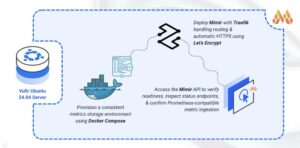
Mimir is an open-source, horizontally scalable time-series database designed for long-term storage of Prometheus metrics. Developed by Grafana Labs, it provides high availability, multi-tenancy, and seamless integration with Prometheus and Grafana. Mimir enables organizations to store and query billions of active time series while maintaining fast query performance across months or years of historical data.
In this article, you will deploy Mimir using Docker Compose, configure persistent storage for metrics data, and set up Traefik as a reverse proxy to securely access your Mimir instance.
Prerequisites
Before you begin, you need to:
- Have access to an Ubuntu 24.04-based server as a non-root user with
sudoprivileges. - Install Docker and Docker Compose.
- Configure a domain A record pointing to your server’s IP address (for example,
mimir.example.com).
Set Up the Directory Structure and Environment Variables
In this section, you prepare the required directory structure for Mimir and define environment variables in a .env file.
- Create the directory structure for Mimir.
console
$ mkdir -p ~/mimir-metrics/{mimir-data,mimir-config}
These directories store time-series blocks, WAL files, and configuration settings.
- Navigate into the
mimir-metricsdirectory.console$ cd ~/mimir-metrics
- Create a
.envfile.console$ nano .envAdd the following variables:
iniDOMAIN=mimir.example.com LETSENCRYPT_EMAIL=admin@example.com
Replace:
mimir.example.comwith your domain.admin@example.comwith your email.
Save and close the file.
- Create a Mimir configuration file.
console
$ nano mimir-config/mimir-config.yaml - Add the following content.
yaml
multitenancy_enabled: false

server:
  http_listen_port: 9009
  log_level: info

blocks_storage:
  backend: filesystem
  filesystem:
    dir: /data/blocks
  tsdb:
    dir: /data/tsdb
    retention_period: 24h

compactor:
  data_dir: /data/compactor
  sharding_ring:
    kvstore:
      store: memberlist

distributor:
  ring:
    kvstore:
      store: memberlist

ingester:
  ring:
    kvstore:
      store: memberlist
    replication_factor: 1

store_gateway:
  sharding_ring:
    kvstore:
      store: memberlist

ruler_storage:
  backend: filesystem
  filesystem:
    dir: /data/rules

limits:
  max_global_series_per_user: 0
  ingestion_rate: 0
  ingestion_burst_size: 0
Save and close the file.
This configuration establishes single-node operation with filesystem storage. The
memberlistkey-value store handles internal coordination, whileblocks_storagemanages the time-series database with local persistence. Setting limits to0removes ingestion restrictions for development deployments.
Deploy with Docker Compose
In this section, you create and deploy the Docker Compose stack that runs Mimir behind Traefik. Docker Compose manages both containers, applies the environment variables from your .env file, and automatically configures HTTPS routing through Traefik.
- Create a new Docker Compose manifest.
console
$ nano docker-compose.yaml - Add the following content.
yaml
services:
  traefik:
    image: traefik:v3.6
    container_name: traefik
    command:
      - "--providers.docker=true"
      - "--providers.docker.exposedbydefault=false"
      - "--entrypoints.web.address=:80"
      - "--entrypoints.websecure.address=:443"
      - "--entrypoints.web.http.redirections.entrypoint.to=websecure"
      - "--entrypoints.web.http.redirections.entrypoint.scheme=https"
      - "--certificatesresolvers.letsencrypt.acme.httpchallenge=true"
      - "--certificatesresolvers.letsencrypt.acme.httpchallenge.entrypoint=web"
      - "--certificatesresolvers.letsencrypt.acme.email=${LETSENCRYPT_EMAIL}"
      - "--certificatesresolvers.letsencrypt.acme.storage=/letsencrypt/acme.json"
    ports:
      - "80:80"
      - "443:443"
    volumes:
      - "letsencrypt:/letsencrypt"
      - "/var/run/docker.sock:/var/run/docker.sock:ro"
    restart: unless-stopped

  mimir:
    image: grafana/mimir:latest
    container_name: mimir
    hostname: mimir
    expose:
      - "9009"
    volumes:
      - "./mimir-config/mimir-config.yaml:/etc/mimir/mimir-config.yaml"
      - "./mimir-data:/data"
    command: -config.file=/etc/mimir/mimir-config.yaml
    labels:
      - "traefik.enable=true"
      - "traefik.http.routers.mimir.rule=Host(`${DOMAIN}`)"
      - "traefik.http.routers.mimir.entrypoints=websecure"
      - "traefik.http.routers.mimir.tls.certresolver=letsencrypt"
      - "traefik.http.services.mimir.loadbalancer.server.port=9009"
    restart: unless-stopped

volumes:
  letsencrypt:
Save and close the file.
This deployment manifest includes:
- services: Two containers constitute the metrics storage platform:
- traefik: Manages incoming connections, provisions SSL certificates automatically, and forwards requests to Mimir.
- mimir: Executes the time-series database engine and exposes Prometheus-compatible APIs.
- image: Container images are sourced from Grafana Labs’ official Docker Hub repository.
- container_name: Descriptive naming conventions simplify administrative tasks and log analysis.
- command (Traefik): Establishes Docker provider settings, configures HTTP/HTTPS entry points on ports 80 and 443, enables automatic protocol redirection, and activates Let’s Encrypt certificate automation via HTTP-01 challenge.
- command (Mimir): Specifies the configuration file path within the container environment.
- ports (Traefik): Binds standard web ports for external client connectivity.
- expose (Mimir): Opens port 9009 within the Docker network for internal routing without public exposure.
- volumes:
- Configuration and data directories preserve settings and time-series blocks through container recreation.
- The
letsencryptnamed volume maintains certificate persistence across service restarts. - Docker socket mounting enables Traefik to detect running containers for dynamic routing.
- labels (Mimir): Traefik annotations that activate proxy functionality, define hostname-based routing rules, attach SSL certificates, and declare the backend service port.
- restart: unless-stopped: Ensures automatic service recovery following system events unless explicitly stopped.
- services: Two containers constitute the metrics storage platform:
- Create and start the services.
console
$ docker compose up -d - Verify that the services are running.
console
$ docker compose psOutput:
NAME      IMAGE                  COMMAND                  SERVICE   CREATED          STATUS          PORTS
mimir     grafana/mimir:latest   "/bin/mimir -config.…"   mimir     25 seconds ago   Up 24 seconds   8080/tcp, 9009/tcp
traefik   traefik:v3.6           "/entrypoint.sh --pr…"   traefik   25 seconds ago   Up 24 seconds   0.0.0.0:80->80/tcp, [::]:80->80/tcp, 0.0.0.0:443->443/tcp, [::]:443->443/tcp
Both containers are running. Mimir accepts metrics while Traefik handles connections on ports
80and443. - View the logs of the services.
console
$ docker compose logsFor more information on managing a Docker Compose stack, see the How To Use Docker Compose article.
Access Mimir
This section demonstrates accessing the Mimir API to verify your installation by checking service health and querying the Prometheus-compatible endpoints.
- Check the service readiness endpoint.
console
$ curl https://mimir.example.com/readyOutput:
readyThis confirms Mimir has initialized successfully and is accepting requests.
- Verify Mimir build information.
console
$ curl https://mimir.example.com/api/v1/status/buildinfoOutput displays version details, confirming the API is responding correctly.
- Query the current configuration.
console
$ curl https://mimir.example.com/api/v1/status/configOutput returns the active configuration in YAML format, confirming Mimir loaded your settings properly.
- Check ingester ring status.
console
$ curl https://mimir.example.com/ingester/ringOutput displays the internal ring status showing this node as active and ready to receive metrics.
Conclusion
You have successfully deployed Mimir for long-term metrics storage with HTTPS encryption. The Docker Compose architecture pairs the time-series database with automated SSL certificate management, while persistent volumes maintain your metrics data through container updates and restarts. Traefik handles secure traffic routing and certificate renewal seamlessly. Your Mimir instance is ready to receive metrics from Prometheus instances via remote write, store historical data efficiently, and serve PromQL queries for visualization in Grafana dashboards.