How to Deploy CouchDB – JSON Document Store

How to Deploy CouchDB – JSON Document Store
Deploy CouchDB with Docker Compose on Ubuntu 24.04 using Traefik for secure access.
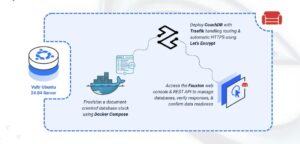
CouchDB is an open-source document-oriented database that stores data as JSON documents. It provides a RESTful HTTP API for all database operations, built-in replication, and multi-version concurrency control. CouchDB’s schema-free design makes it ideal for log storage where document structures may vary, and its HTTP-based interface simplifies integration with log collection tools.
In this article, you will deploy CouchDB using Docker Compose, configure persistent storage for database files, and set up Traefik as a reverse proxy to securely access your CouchDB instance.
Prerequisites
Before you begin, you need to:
- Have access to an Ubuntu 24.04-based server as a non-root user with
sudoprivileges. - Install Docker and Docker Compose.
- Configure a domain A record pointing to your server’s IP address (for example,
couchdb.example.com).
Set Up the Directory Structure and Environment Variables
In this section, you prepare the required directory structure for CouchDB and define environment variables in a .env file.
- Create the directory structure for CouchDB.
console
$ mkdir -p ~/couchdb-logging/couchdb-dataThis directory stores database files, views, and configuration settings.
- Navigate into the
couchdb-loggingdirectory.console$ cd ~/couchdb-logging
- Set proper ownership for the CouchDB data directory. CouchDB runs as the
couchdbuser (UID 5984) inside the container.console$ sudo chown -R 5984:5984 couchdb-data
- Create a
.envfile.console$ nano .envAdd the following variables:
iniDOMAIN=couchdb.example.com LETSENCRYPT_EMAIL=admin@example.com COUCHDB_USER=admin COUCHDB_PASSWORD=changeme
Replace:
couchdb.example.comwith your domain.admin@example.comwith your email.changemewith a strong password.
Save and close the file.
Deploy with Docker Compose
In this section, you create and deploy the Docker Compose stack that runs CouchDB behind Traefik. Docker Compose manages both containers, applies the environment variables from your .env file, and automatically configures HTTPS routing through Traefik.
- Create a new Docker Compose manifest.
console
$ nano docker-compose.yaml - Add the following content.
yaml
services:
  traefik:
    image: traefik:v3.6
    container_name: traefik
    command:
      - "--providers.docker=true"
      - "--providers.docker.exposedbydefault=false"
      - "--entrypoints.web.address=:80"
      - "--entrypoints.websecure.address=:443"
      - "--entrypoints.web.http.redirections.entrypoint.to=websecure"
      - "--entrypoints.web.http.redirections.entrypoint.scheme=https"
      - "--certificatesresolvers.letsencrypt.acme.httpchallenge=true"
      - "--certificatesresolvers.letsencrypt.acme.httpchallenge.entrypoint=web"
      - "--certificatesresolvers.letsencrypt.acme.email=${LETSENCRYPT_EMAIL}"
      - "--certificatesresolvers.letsencrypt.acme.storage=/letsencrypt/acme.json"
    ports:
      - "80:80"
      - "443:443"
    volumes:
      - "letsencrypt:/letsencrypt"
      - "/var/run/docker.sock:/var/run/docker.sock:ro"
    restart: unless-stopped

  couchdb:
    image: couchdb:latest
    container_name: couchdb
    hostname: couchdb
    expose:
      - "5984"
    volumes:
      - "./couchdb-data:/opt/couchdb/data"
    environment:
      - COUCHDB_USER=${COUCHDB_USER}
      - COUCHDB_PASSWORD=${COUCHDB_PASSWORD}
    labels:
      - "traefik.enable=true"
      - "traefik.http.routers.couchdb.rule=Host(`${DOMAIN}`)"
      - "traefik.http.routers.couchdb.entrypoints=websecure"
      - "traefik.http.routers.couchdb.tls.certresolver=letsencrypt"
      - "traefik.http.services.couchdb.loadbalancer.server.port=5984"
    restart: unless-stopped

volumes:
  letsencrypt:
Save and close the file.
This configuration includes:
- services: Two containers collaborate to provide the database stack:
- traefik: Functions as the edge router, obtaining SSL certificates and directing HTTPS traffic to the database.
- couchdb: Hosts the NoSQL database engine and serves the RESTful API and web interface.
- image: Pulls official container images from Docker Hub’s verified publishers.
- container_name: Uses descriptive static names for straightforward container operations.
- command (Traefik): Activates Docker-based service discovery, opens HTTP (80) and HTTPS (443) listeners, redirects all HTTP to HTTPS automatically, and configures Let’s Encrypt ACME client with HTTP-01 challenge method.
- ports (Traefik): Exposes web service ports 80 and 443 to the host system for public access.
- expose (CouchDB): Opens port 5984 for inter-container communication only, blocking direct external connections.
- volumes:
- Bind mount (
./couchdb-data) preserves database files and documents across restarts. - Named volume
letsencryptmaintains SSL certificate storage independently. - Read-only Docker socket access (
/var/run/docker.sock:ro) enables dynamic container detection.
- Bind mount (
- environment (CouchDB): References administrator credentials from the
.envfile. - labels (CouchDB): Configuration annotations instructing Traefik to proxy requests, route by domain name, attach SSL certificates, and specify the backend service port.
- restart: unless-stopped: Ensures containers resume operation automatically after failures, excluding manual stops.
- services: Two containers collaborate to provide the database stack:
- Create and start the services.
console
$ docker compose up -d - Verify that the services are running.
console
$ docker compose psOutput:
NAME      IMAGE            COMMAND                  SERVICE   CREATED          STATUS          PORTS
couchdb   couchdb:latest   "tini -- /docker-ent…"   couchdb   18 seconds ago   Up 17 seconds   5984/tcp
traefik   traefik:v3.6     "/entrypoint.sh --pr…"   traefik   18 seconds ago   Up 17 seconds   0.0.0.0:80->80/tcp, [::]:80->80/tcp, 0.0.0.0:443->443/tcp, [::]:443->443/tcp
Both containers are operational. CouchDB accepts database requests while Traefik manages connections on ports
80and443. - View the logs of the services.
console
$ docker compose logsFor more information on managing a Docker Compose stack, see the How To Use Docker Compose article.
Access CouchDB
This section shows how to confirm your CouchDB installation by accessing the Fauxton web console and executing fundamental database operations via the RESTful HTTP interface.
- Open the CouchDB web interface in your browser.
https://couchdb.example.com/_utils - Sign in with the credentials you configured in the
.envfile:- Username: The value you set for
COUCHDB_USER(default:admin) - Password: The value you set for
COUCHDB_PASSWORD
- Username: The value you set for
- The Fauxton interface displays. This web-based administration console allows you to manage databases, documents, and replication settings.
- Verify CouchDB is responding using the command line.
console
$ curl https://couchdb.example.comOutput:
{ "couchdb": "Welcome", "version": "3.5.1", "git_sha": "44f6a43d8", "uuid": "92800b247a331df27afce9ad744a370b", "features": [ "access-ready", "partitioned", "pluggable-storage-engines", "reshard", "scheduler" ], "vendor": { "name": "The Apache Software Foundation" } } - Create a test database.
console
$ curl -X PUT https://admin:changeme@couchdb.example.com/logsReplace
admin:changemewith your actual credentials.Output:
{"ok":true} - Insert a sample log document.
console
$ curl -X POST https://admin:changeme@couchdb.example.com/logs \
  -H "Content-Type: application/json" \
  -d '{
    "timestamp": "2025-12-01T20:47:23Z",
    "level": "INFO",
    "message": "Application started successfully",
    "service": "web-server"
  }'
Output includes the document ID and revision:
{"ok":true,"id":"f234689e3359a8a43434713cb20008a5","rev":"1-6a43114e6467b83a73137f1112b9db8e"} - Retrieve all documents from the database.
console
$ curl https://admin:changeme@couchdb.example.com/logs/_all_docsThe response confirms your document was stored successfully.
Conclusion
You have successfully deployed CouchDB for log management with HTTPS encryption. The containerized architecture pairs the document database with automated certificate management, ensuring data persistence across service restarts through bind-mounted volumes. Traefik handles SSL termination and request routing while Let’s Encrypt provisions trusted certificates. Your CouchDB deployment can now accept JSON log documents via its RESTful interface, support real-time replication across nodes, and enable advanced log analysis through MapReduce queries and the Fauxton web console.